FontCurator 9.3.0 · Font management for macOS · 2026
The professional font manager for Mac.
The font librarian professionals have been waiting for — catalogue every typeface on your Mac, inspect it deeply, group by client project, and prove the licensing, without leaving Font Book in chaos.
FontCurator is a Mac app — send yourself the link to open on your Mac.
Already on a Mac? Download the trial Buy FontCuratormacOS + · Apple Silicon & Intel · One-time purchase
01 · Catalogue
Font management for every font on your Mac — finally in one place.
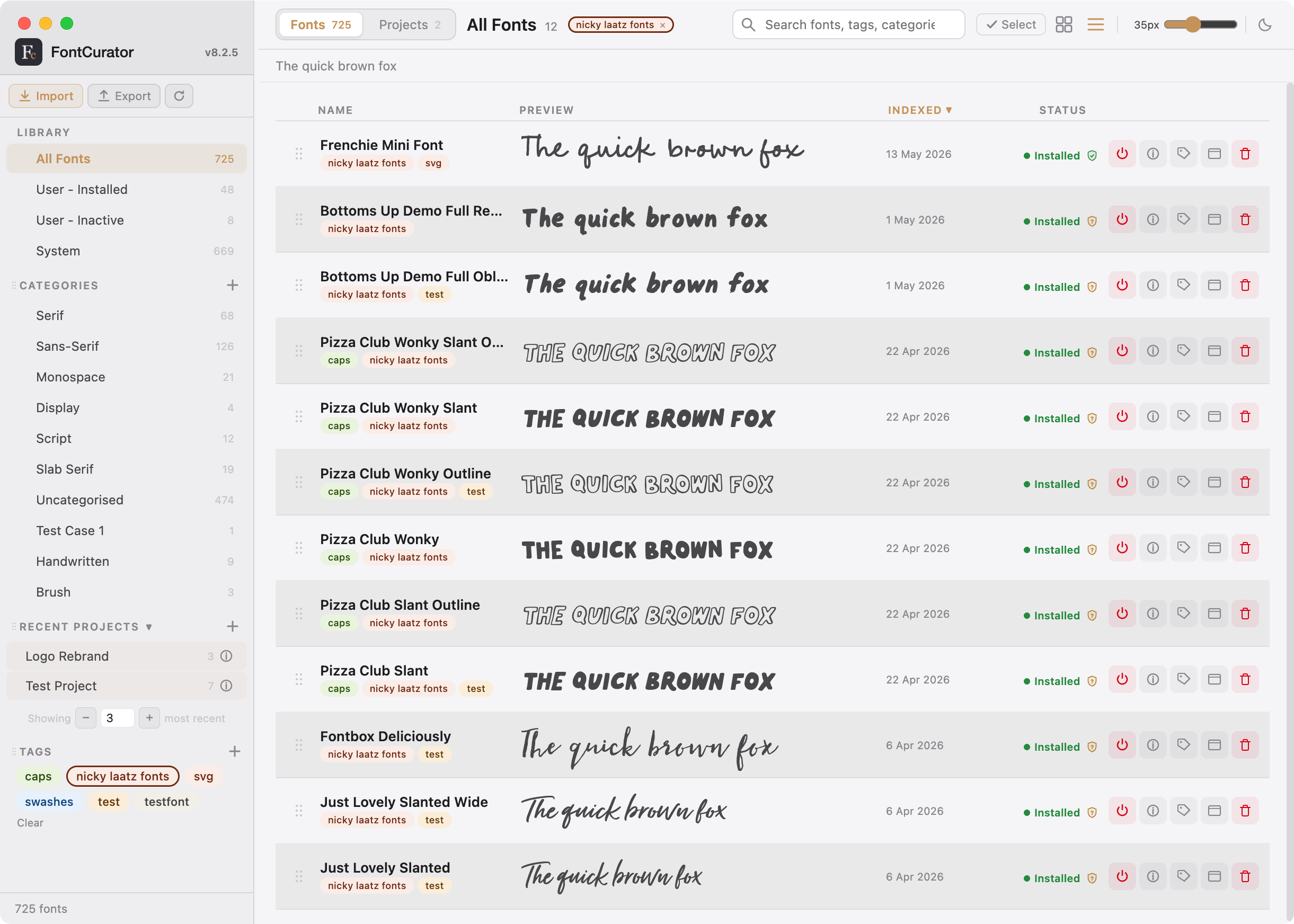
Your fonts stay where macOS already keeps them — in Font Book, in User Fonts, in Adobe’s folder. FontCurator catalogues every one of them into a single fast, searchable workspace. No imports. No duplicates. No taking your library hostage.
- Live previews, grid or list, light or dark
- Categories & tags — the same font in every cut you’d ever make
- Preview tab with toggleable OpenType chips — alternates, ligatures, stylistic sets, live
- Saved pairings live on the font — recallable from every future project
02 · Project
The project is the unit of work.
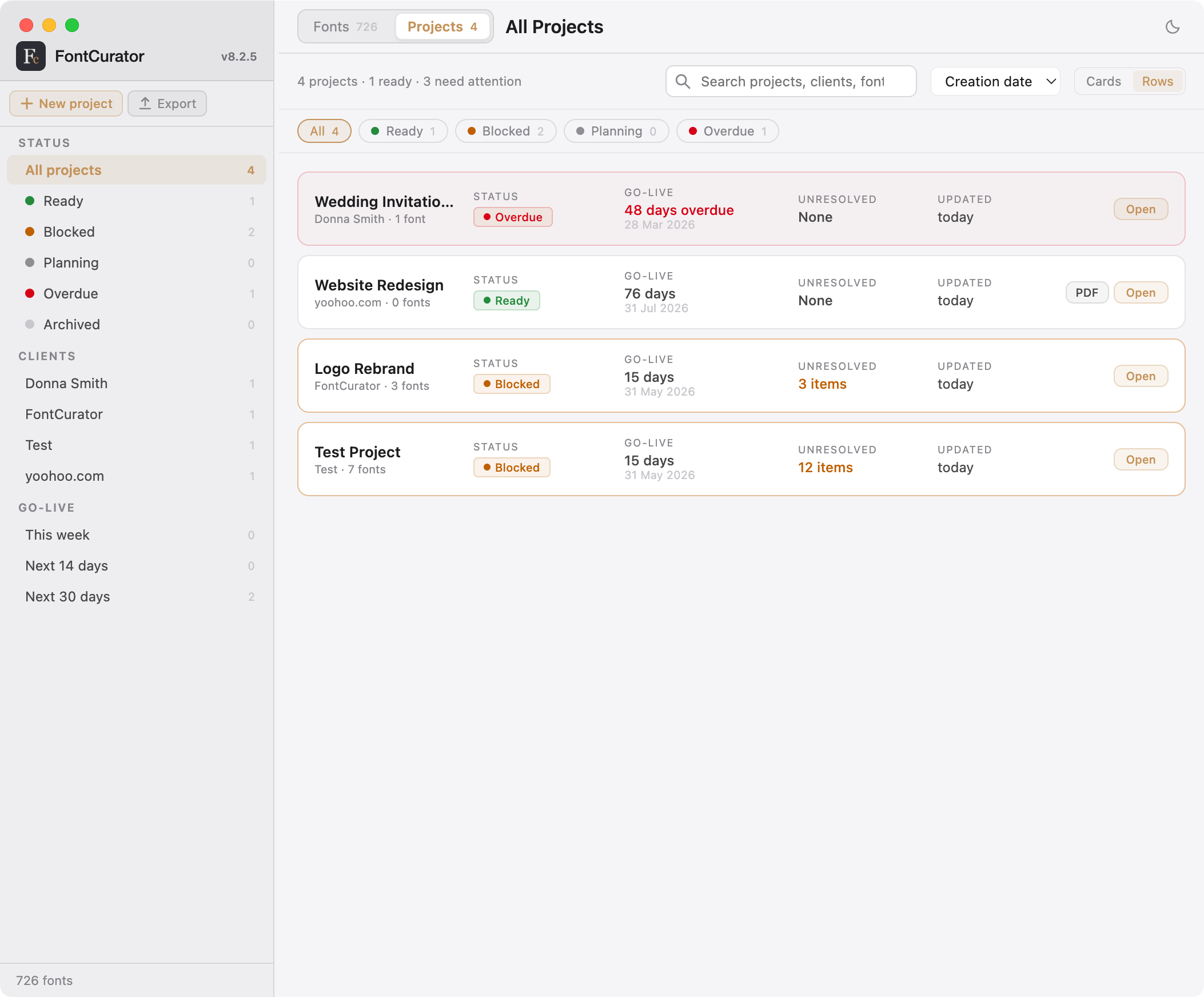
Every brand, campaign, or publication gets its own workspace — with a font roster, locale list, pairings, team contacts, and a live readiness scorecard. The part of font management most Mac tools don’t take seriously.
- Eight tabs per project: Overview, Fonts, Pairings, Licensing, Team, Readiness, Activity, Export
- Status pills: Ready · Planning · Blocked · Overdue
- Add a font — FontCurator offers its saved pairings for import, in one click
03 · Prove
When the auditor asks, you say yes.
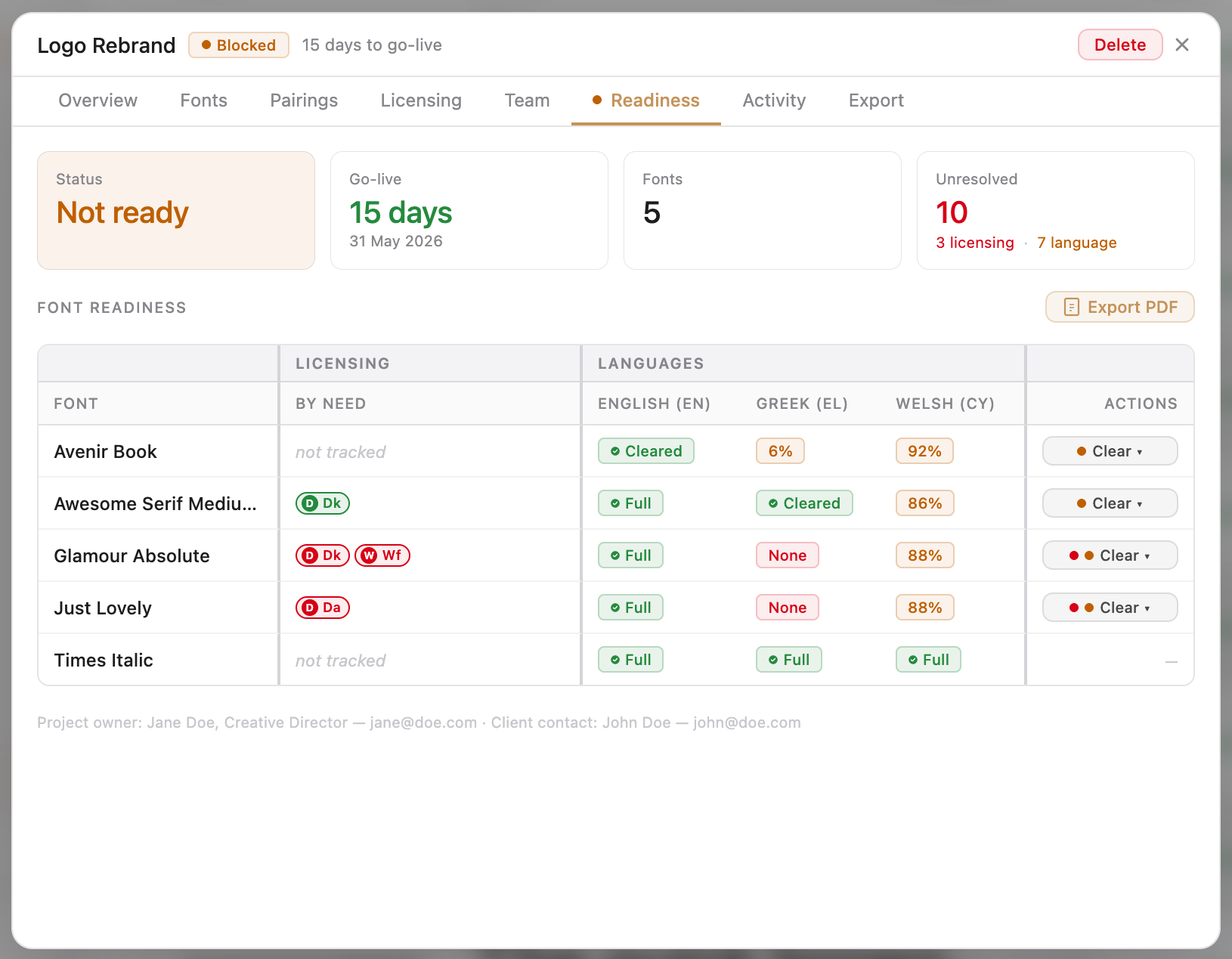
A font is technically capable of Polish; that doesn’t mean it’s cleared for your Polish-market campaign. FontCurator tracks both — font by font, language by language — and exports a single audit-grade PDF when legal calls.
- Per-font & per-project license records, with the invoice + agreement attached
- Language coverage analysed against the CLDR exemplar database for 1,000+ written languages
- One PDF answers “are we good to launch?” and “show me the licensing.”
04 · Compare
Two fonts, side by side.
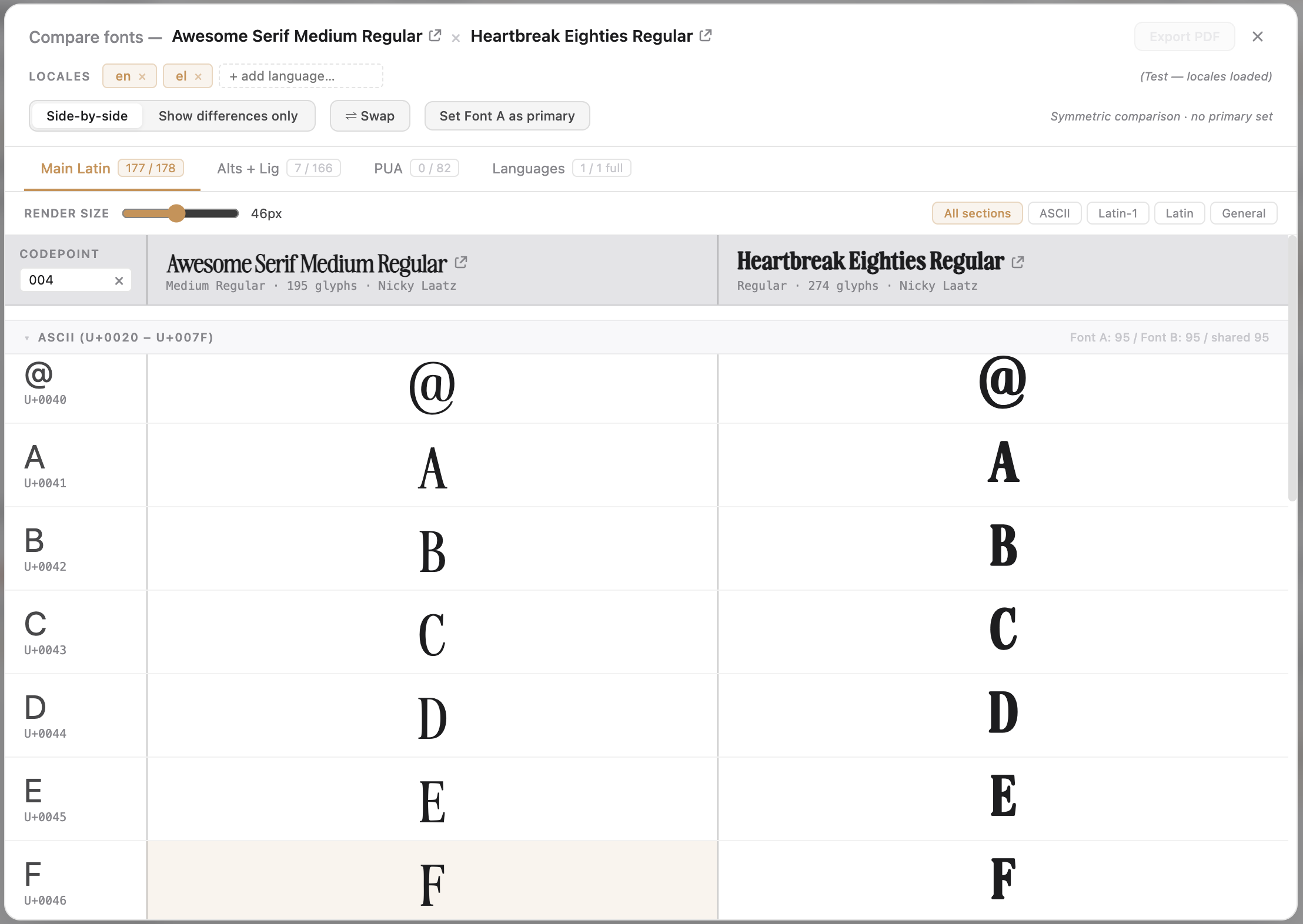
New in 9.1.0. Choosing between two faces — for a pairing, a substitution, a clearance call? Select both, click Compare, and they open in one window: glyphs, OpenType features, the Private Use Area, and language coverage, aligned row for row.
- Four tabs — Main Latin, Alts + Lig, PUA, Languages — every row aligned by codepoint or feature
- “Show differences only” hides what matches and keeps what differs
- Any cell zooms to a full-scale, side-by-side glyph view you can step through
Why FontCurator
Type is a craft. The paperwork shouldn’t be.
1,000+
languages analysed per font
20
feature areas, one app
0
subscriptions, ever
Pricing
Pay once. Own it.
FontCurator 9.3.0
$30.00 $21.00
Early-adopter launch — 30% off
USD · 2 Mac activations included
FAQ
Before you buy.
The questions that come up most often when deciding whether FontCurator fits your workflow.
The short answer right now is No.
It is not a definite no, but we (just one person) are already maintaining multiple builds (MacOS silicon and Intel and more recently the Free trial for Silicon and Intel), which when you think about a $20 price point, it is already is a massive effort, it just adds more builds and more time, which means higher costs and that was never the goal. FontCurator was supposed to come in at the cost of a font!
The longer answer.
This all started with Nicky being fed up with her Font Manager App, her go to tool for a couple of years. Everyone is moving from pay once to subscriptions and obfuscating the library and then the apps features were just not working for her anymore. Enter FontCurator, a simple MacOs tool that offers a typographer a focused working tool. It has taken a year to get here from the first build and we never intended to sell it, but Nicky likes it so much that we thought, why not. That lead to more features and trying to round out a focused typographer app into something we could launch.
If one day FontCurator goes big! Sure we will make a windows version. But FontCurator was never meant to be a Windows App and was never meant to be a public app.
At the moment, it is a team of 1 and Nicky and I are very happy to keep it focused and small and perhaps one day it will pay for itself, if we ever get there, then perhaps a Windows version will happen.
One purchase, up to 99 “seats” — each seat is a Mac (Single User).
Activate each license up to two times (i.e. your desktop and your laptop). Need more seats? Buy more at checkout.
Bought a new computer and need to recover an activation? Your order confirmation email has all the details for recovering your download and deactivating slots. Lost your email Contact us.
We recommend the latest version of macOS for both Apple Silicon and Intel builds.
We have tested the following on various M series Apple Silicon Macs:
- macOS 14 (Sonoma)
- macOS 15 (Sequoia)
- macOS 26 (Tahoe)
We have tested the following on Intel Macs:
- macOS 15 (Sequoia)
The FontCurator baseline for macOS integration is macOS 12.0 (Monterey) and while all features should be supported, we have not yet tested it and is therefore not advised.
Intel Macs are supported as of v9.2.0.
If you are having issues, please log a bug report.
Yes. The version you buy today runs for as long as your Mac supports it — no forced updates (free) or upgrades (paid).
- Updates are free patches that fix bugs or issues with the current version. Most updates are recommended, but not mandatory.
- Upgrades are paid new releases with improvements and new features. Upgrades are optional and we will not switch off your version.
We don’t commit to issuing OS-compatibility patches, but when a new major version offers something worth having, existing customers get discounted upgrade pricing. Enter your old key at checkout.
Yes! We offer a completely Free Trial for you to test drive FontCurator.
Once you have purchased a license, digital purchases are final — once a licence key is delivered we can’t take it back.
Try it first and read the feature pages, then make a decision if FontCurator is right for you. Contact Us with any questions you have before you click buy.
Yes. Each seat is a separate licence key that activates on up to two Macs (a single licence covers your laptop + desktop).
NB! FontCurator is not a cloud app, so your font collection will more than likely be different on different Macs.
Buy more seats at checkout for additional users — default is one seat, up to ninety-nine.
Need to move an activation? Contact support to release a stale one.
Bought already and stuck on something specific? Drop us a line.